How to Do Financial Forecasting: Event Director Guide
Financial Forecasting for Event Directors Contents
- Financial Forecasting for Event Directors
- 1. Set Overall Revenue Targets
- 2. Plan to Meet Revenue Goals
- Event Director Cash Flow Analysis
- Built-in Financial Analysis Tools for Event Directors
- 1. Forecasting
- 2. Event Revenue Breakdown
- 3. Median Order Stats
- 4. Real-time Financial Statements
- 5. Direct Deposit Reports
- 6. QuickBooks Integration
Conducting regular financial forecasting and analysis helps you ensure your event is fiscally viable and profitable.
- Financial Forecasting for Event Directors
- Event Director Cash Flow Analysis
- Built-in Financial Analysis Tools for Event Directors
With financial forecasting, analysis and built-in financial software, you’ll know what to do to create an event and establish it as a tradition in your community.
Financial Forecasting for Event Directors
Financial forecasting is setting targets for how much revenue you will bring to your event. Event revenue sources include:
- Ticket Sales
- Registrations
- Vendor Booth Sales
- Sponsor Deals
- Merchandise & Concessions
Some of the above sources may not apply to your event, so you can omit them in your forecasting. (Alternatively, you can look into adding some of these as a new revenue source for your event.)
Follow the steps below to forecast your event revenue:
1. Set Overall Revenue Targets
In your sales forecast, plan how much revenue you plan to generate from each of your revenue sources.
Next, do a quick gut check against your planned expenses – are you planning to generate enough revenue to cover those expenses? If not, you’ll want to increase your revenue targets.
2. Plan to Meet Revenue Goals
Once you’re happy with your revenue forecast, start making plans to reach your revenue goals.
For example, you may start with your sponsor and vendor sales goals:
- Plan when to start outreach to sponsors and vendors.
- Price your sponsor packages.
- Determine which and how many companies and businesses you’ll reach out to.
You may emphasize sponsor and vendor outreach and sales in the 12-6 months before your event. In these months, the operational demands and ticket sales take up less time, so you can really make the most out of it with early sponsor outreach.
How to Close More Sponsor Deals (4 Easy Strategies)
You’ll also want to plan to reach your attendee and participant goals:
- Set your ticket or registration prices and determine any price increases.
- Plan when you’re opening sales.
- Identify marketing tactics to help you sell more.
Follow the similar procedures for your other revenue sources. Then, track your progress on implementing your goals.
You can set monthly targets and weekly targets to help ensure you stay on track. You’ll also want to pay attention to your marketing return on investment (ROI).
If you’re a nonprofit organizing a fundraiser, include your fundraising target in your financial forecasting and outline plans to reach it.
Event Director Cash Flow Analysis
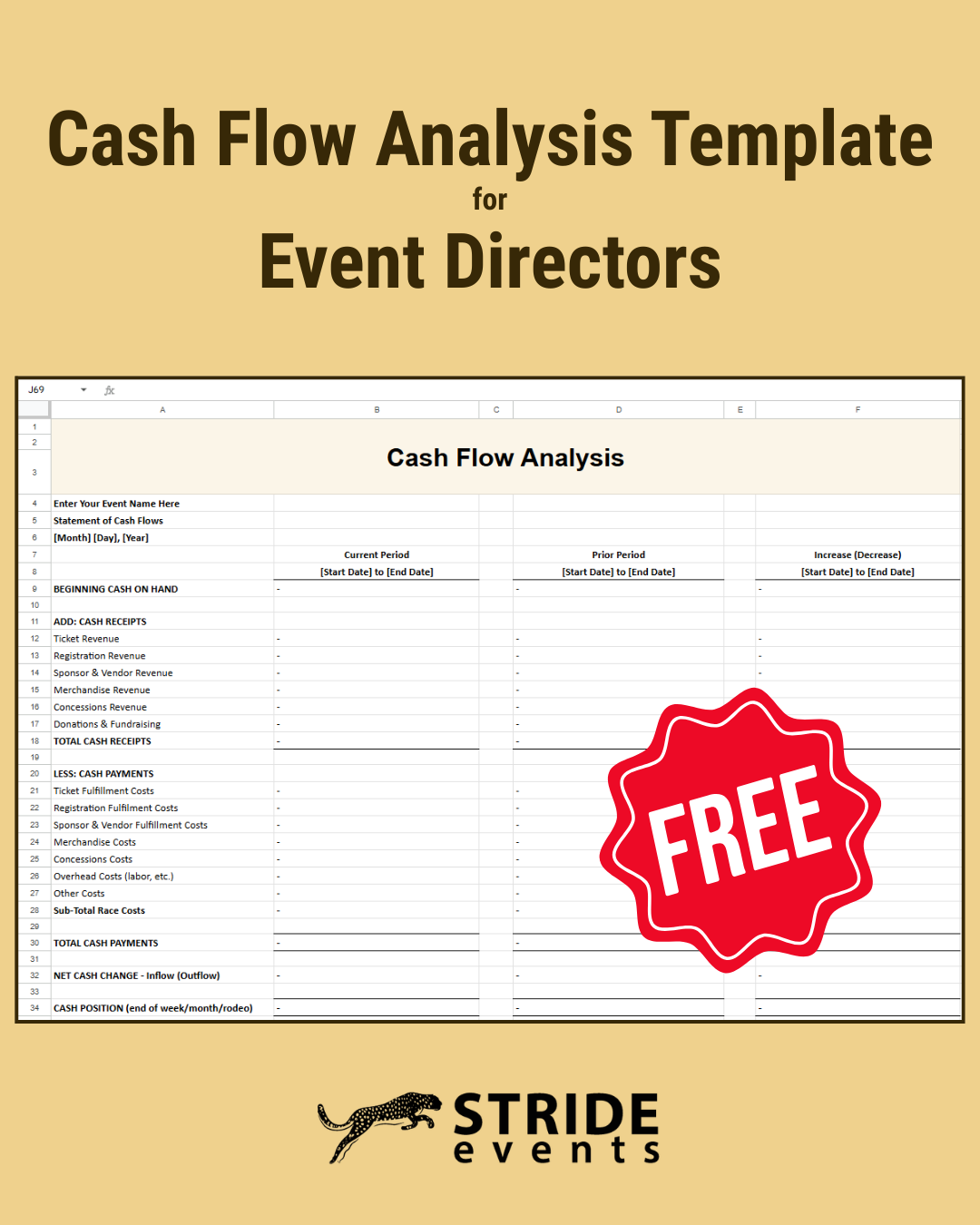
In the months leading up to your event, you’ll want to conduct a regular cash flow analysis to ensure that you are cash positive.
Track how much cash you have on-hand to cover expenses and note which expenses are coming due each month. Throughout the year leading up to your event, be sure to set aside funds so you can cover all of these expenses.
Use our free, downloadable cash flow analysis template for event directors to help you complete this analysis.
As you’re choosing your ticketing platform, pay attention to how frequently the company disperses your event revenue to you. Some ticketing companies disburse funds to events after the event is over.
Stride Events offers event directors bi-monthly disbursements of event funds, so you have access to your funds quickly.
Built-in Financial Analysis Tools for Event Directors
Stride Events offers several built-in financial analysis tools and integrations that you can use to understand your event’s finances better.
- Forecasting
- Event Revenue Breakdown
- Median Order Stats
- Real-time Financial Statements
- Direct Deposit Reports
- QuickBooks Integration
With these tools, you’ll have the information you need to make smart business decisions for your event.
1. Forecasting
With a built-in forecasting tool, you can set your event revenue goal and automatically track your progress towards it. All revenue processed through Stride Events’ system is tracked automatically for you – ticket sales, registrations, sponsor payments, booth sales, etc. You can also add revenue not tracked in our system so you have a full picture of your revenue.
You can also use forecasting to plan and track your spending and expenses. Add your costs and plan for them. Record the actual cost when you get the final bill.
2. Event Revenue Breakdown
Stride Events also offers an event revenue summary breakdown:
- Total Revenue Collected from Sales
- Event Portion of Sales
- Online Service Fee
- Marketplace Tax (remitted for you on online sales)
- Sales Tax (tax collected on cash and check orders)
With this data, you’ll get a bird’s eye view of your revenue and sales tax.
3. Median Order Stats
You’ll also benefit from median order stats for ticket sales and registration. Medians offer a more realistic sense of your orders because an unusually large order skews your average.
With these medians, you’ll understand how much revenue each ticket order and registration order represents, how many tickets or registrations are in a typical order, and how long it takes your attendees and participants to complete an order.
With this information, you can learn more about your audience, set discounts and incentives to increase order sizes, and even consider upselling opportunities.
4. Real-time Financial Statements
See your revenue in real-time and quickly see the breakdown of each of your disbursements. You’ll see what portion comes from ticket sales, registration, charity donations, product sales, and sponsor sales. You’ll also see what discounts you offered and any refunds you offered during that pay period.
5. Direct Deposit Reports
You can also create direct deposit reports that are automatically emailed to you for each direct deposit.
6. QuickBooks Integration
If you’re already using QuickBooks to analyze your finances, you can easily get the information you need from Stride Events’ system into your QuickBooks. We offer an integration with QuickBooks Online, or you can complete a quick download to use with the desktop version.